Tools · Replit
When Replit stalls, and what to say
Some guides running this weekend have never vibe-coded. Replit takes plain-English instructions. The expensive mistake is spending ten minutes of a fifty-minute block staring at a spinner. Almost every stall in this room is one of six things, and five are fixed by rolling back and asking again.
Read the annotated workspace below once before doors. Then treat the rest of this page as a lookup: a kid describes a symptom, you find it, you say the line.
The point
Your job is to recognize the six common stalls and give the student the next move.
Which model each tier should run
Replit runs three tiers — Power, Economy, Lite — and lets you choose the model behind each. Set them before the block, not during it.
- PowerHigh
- Sol 5.6
- EconomyMedium
- Terra 5.6
- LiteLow
- Deepseek V4 Flash
Tier
Set it to
What you are looking at
Where the agent lives and the app runs. Students start here and spend most of the block in this view.
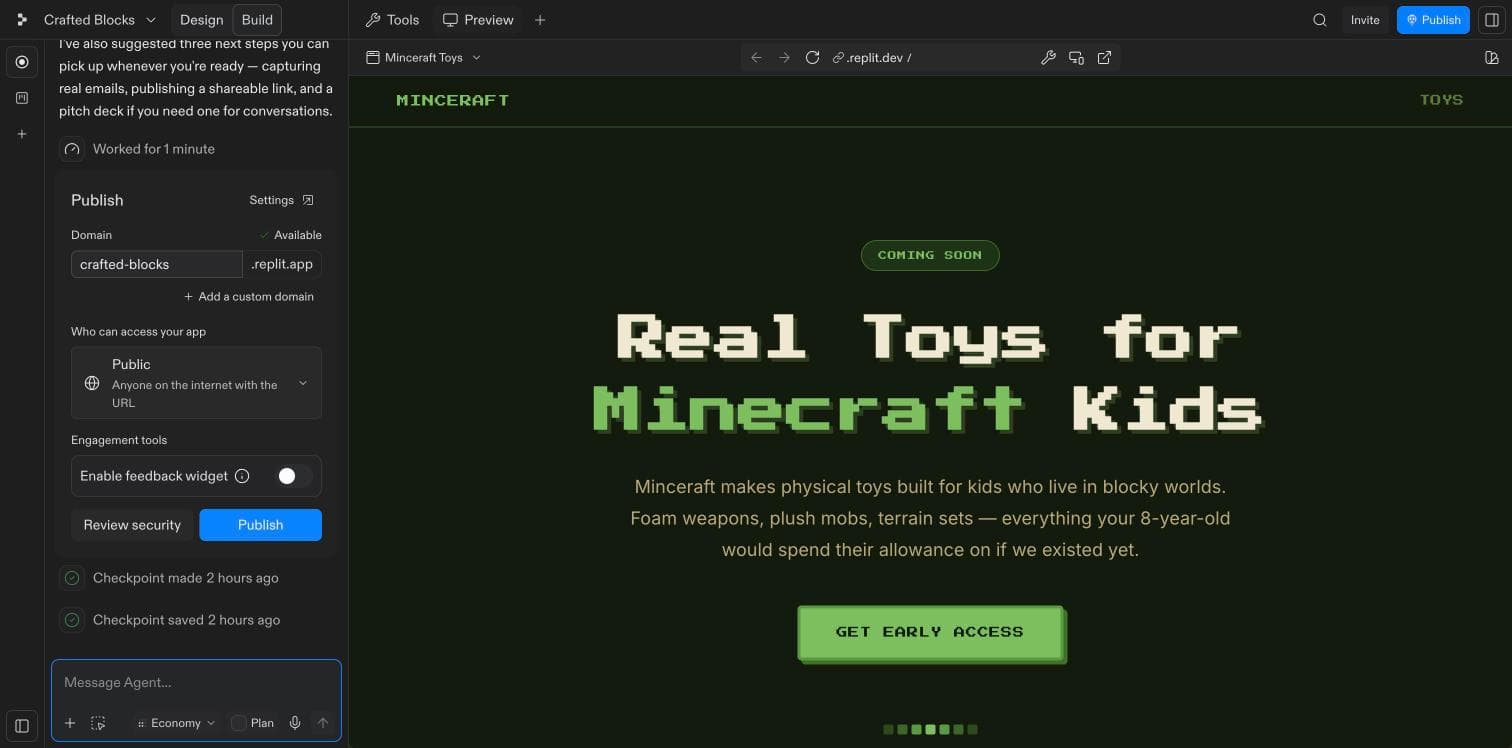
- Design / BuildThe only toggle that matters. Build is the agent and the live app; Design is the same app as something you can click on. A kid who says their page has vanished is usually standing in the wrong one.
- The agent and its last actionIt writes back in plain English every time it finishes, and logs how long it took. Read it out. This is the only part of the screen a non-coder needs to understand.
- CheckpointsA save point after every run. Use it as undo: roll back to the last good checkpoint and ask again with a clearer prompt.
- The box you type inEverything they will ever do to this app happens here, in English. No file gets opened by hand all weekend.
- PreviewThe app as a customer would see it, updating as the agent works. Point here when a student asks what they made.
- PublishTurns the preview into a real link. Pick a name, choose who can see it and press the blue button. The preview address dies with the tab.
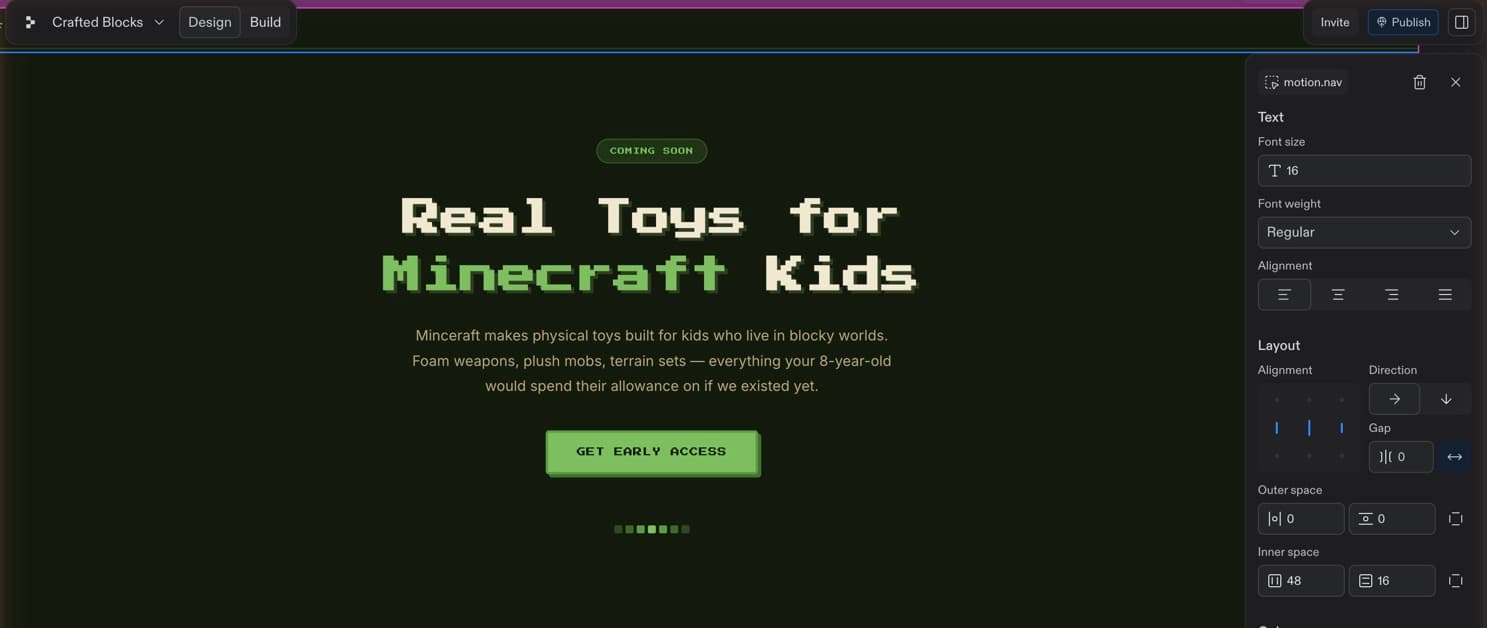
- Design / BuildThe same toggle, flipped. Design lets you select the page itself. Build shows the agent and live app. Both views edit the same project.
- The page, and you can click itThis is the running page. Click a headline, button or nav item to select it. Use this view for a student who works better by pointing than prompting.
- What you have selectedThe panel names the thing you just clicked, and the bin deletes it. Worth saying out loud: if a kid deletes something by accident, that is what checkpoints are for. Nothing here is unrecoverable.
- Safe text controlsSize, weight, alignment. These are the changes to encourage: instant, obvious, impossible to break anything with. This is the designer-hat half of the block.
- Layout and spacingDirection, gap, outer and inner space. A kid can lose twenty minutes nudging these and end up with a worse page. If they want the layout changed, it is faster to say so in Build and let the agent do it.
Hover a number to read what it is. Or tap it — the list is below.
8 things that go wrong, in their words
Find the sentence the kid just said to you. The ones marked Expect it will happen to more than one person in the room, so they are worth saying from the front before they happen to anybody.
“It's just spinning.”
What’s happeningThe app went to sleep and is booting again. Thirty seconds is normal and says nothing about their work. Longer than that and it is the browser tab that has lost the thread, not the app.
- 01Wait thirty seconds, out loud, so they stop clicking things while it boots.
- 02Still spinning? Reload the browser tab, then reopen the preview.
- 03Still spinning after that? Close it and reopen the project from Projects.
- 04Nothing is lost at any point. There is no save button because everything is already saved.
Say thisThe app is waking up. Take your hands off the keyboard and count to thirty with me.
“It says I've hit a limit.”
What’s happeningA free account has a daily agent allowance that resets at midnight UTC: 5pm Pacific and 8pm Eastern. In San Francisco it refills an hour before doors; in an Eastern city it refills mid-block. Core uses a monthly credit balance instead.
- 01Look under the message for a Keep going button and press it. It usually finishes the job.
- 02No button? They are on a free account. Redeem the Core code from Resources now.
- 03Redemption not going through? Pair them with a kid who has credits and finish on one screen. Two kids and one URL beats two kids and none.
- 04Do not let them start over in a new account. They lose the build and the clock.
Say thisLook under that message for Keep going. Click it and let the agent finish.
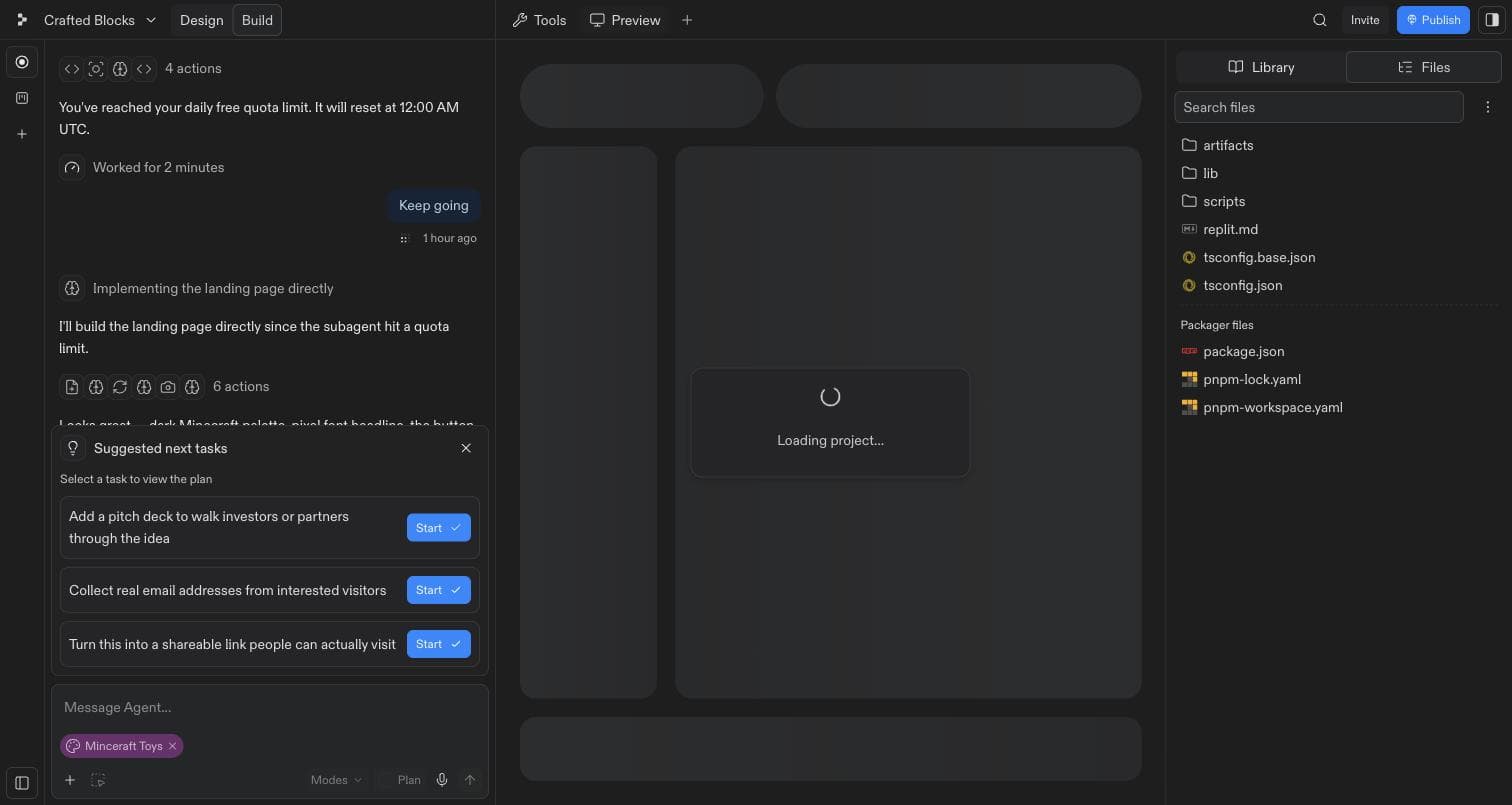
- The wallFree accounts reset their daily agent allowance at midnight UTC: 5pm Pacific and 8pm Eastern. In San Francisco that is an hour before doors; in an Eastern city it lands mid-block.
- Keep goingPress it. The agent can often finish the job itself after a helper hits the quota. Students may read the message as 'you are out' and stop too soon.
- And it carries onIt did finish. Worth pointing at, because the lesson of the night is that a stall is not a failure.
“It built the wrong thing.”
What’s happeningIt built exactly what the prompt said. The prompt was vague, or it asked for four things at once and the agent picked two.
- 01Do not try to correct it in place. Roll back to the last checkpoint.
- 02Re-prompt concretely: what is on the page, top to bottom, in order.
- 03One change per message. A prompt with four asks in it comes back with two of them done.
- 04Read the agent's plan paragraph before it starts building. That is the cheap moment to catch this.
Say thisRoll back to the last good version. Then ask for one change.
“I've been stuck on this for twenty minutes.”
What’s happeningThey are asking the agent to repair its last repair. Each round makes the app stranger and the student more frustrated.
- 01Break the loop out loud. Twenty minutes on one bug is the signal, not the bug itself.
- 02Roll back to the last checkpoint that worked.
- 03Re-prompt for the outcome they want, not for the fix they were chasing.
- 04If it is a colour, font or spacing issue, leave it for later and ship.
Say thisStop here. Roll back to the last version that worked, then ask for the result you want.
“It wants me to add a login / a database / payments.”
What’s happeningThe agent proposes production infrastructure when a prompt sounds like a real product. It is being helpful, and it will happily spend the entire block on a sign-up screen nobody will ever use.
- 01Decline all of it. Nobody in the room needs auth, a database or payments this weekend.
- 02Re-prompt with the guardrail spelled out: “No logins, no payments, no backend. One page.”
- 03If they want to take money, use an Alpha-held Stripe payment link outside the build.
- 04Same answer for the Suggested next tasks panel. Close it.
Say thisFor this sprint, make one page a stranger can react to. Skip the login, database and payments.
“My page is gone.”
What’s happeningAlmost never true. They are either looking at Design when the app lives in Build, or the preview has not finished rebooting. Work is saved continuously and checkpoints go back further than they think.
- 01Check the Design / Build toggle, top left. Put them in Build.
- 02Then give the preview its thirty seconds.
- 03Then walk the checkpoint list. Every agent run left one, and any of them can be restored.
- 04Say plainly that it is not lost, before you start looking. Half of this problem is the panic.
“I want to change the colours and the words.”
What’s happeningVisual changes belong in the back half of the block. Guides often mistake them for off-task work.
- 01Say the change in plain English: “make the headline bigger and the background dark green.”
- 02One thing at a time, and watch the preview while it happens. That loop is the entire hook of the night.
- 03For a missing feature, describe what the customer needs and let the agent choose how to build it.
- 04Then stop. Live and ugly beats pretty and unfinished, and Offer Design is the teardown.
Say thisSay the change in plain English. Try: 'Make the headline bigger and the background dark green.'
“It's finished but there's no link.”
What’s happeningThe preview only lives inside their tab. Publishing creates the public URL they can submit and open later.
- 01Publish, top right. It takes about a minute.
- 02That is the URL for the Wall of URLs and for the car home. The preview address is not.
- 03Publish once. It is slow, not broken, and hammering the button does not help.
- 04Replit ties published apps staying live to credits on the account. Do not promise that a student's link will live forever.
1Before the blockThe five minutes that save the hour6 checks
- Every kid logged in before the block starts. Both retros named account setup as the single biggest time-waster of the weekend, and it is the one problem that is completely free to solve in advance.
- Core codes distributed and redeemed. A code sitting in a kid's inbox still leaves them on a free account, which can hit the daily limit mid-build.
- One real build on the room's own wifi, by you, before anyone arrives. Thirty laptops hitting the same agent at once is the load nobody ever tests for.
- Set the model on each tier before anyone arrives — Power to Sol 5.6, Economy to Terra 5.6. Power ships pointed at the most expensive model in the set, and it is the setting a stuck kid reaches for first.
- Know where the Core code lives in Resources so you can point at it rather than explain it.
- Your own demo app open in a second tab and already booted, so the ten-minute demo does not open on a spinner.
2PromptingWhat a good first prompt looks like1 screenshot
The starter prompt in Resources is already this shape. When a kid needs to re-prompt after a rollback, this is the shape to aim them back at. The third mark is the habit worth teaching.
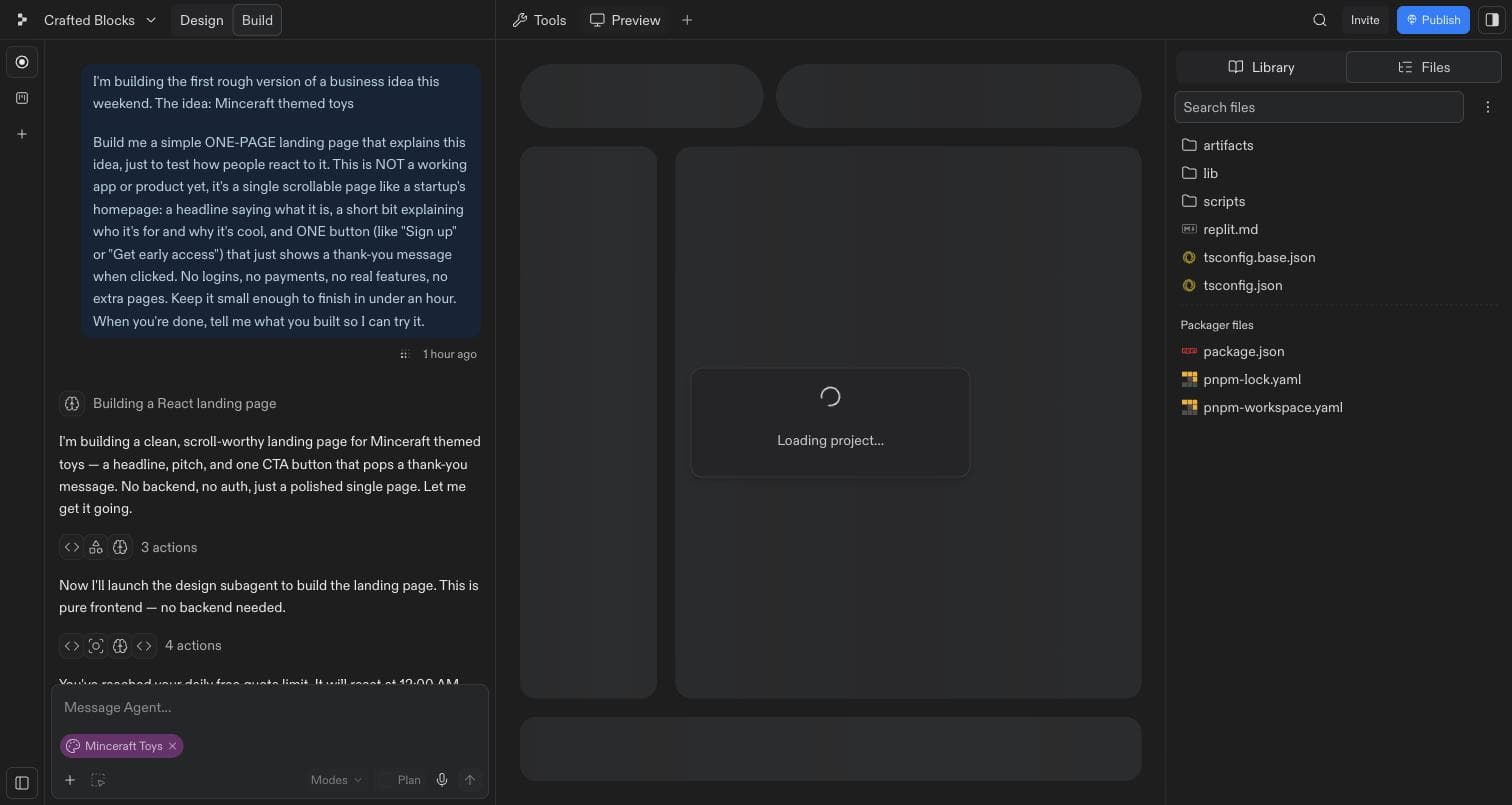
- The prompt does the workIt says what the page is, what belongs on it and what to leave out. 'No logins, no payments, no extra pages' keeps the build under a minute.
- The plan, in EnglishThe agent restates the job before it starts. If this paragraph is not what the kid meant, stop it here. Correcting a plan costs seconds; correcting a finished build costs the block.
- Collapsed actionsThe code it wrote, folded away. Leave it folded. Opening it teaches nothing and eats the clock.
3In the roomCallouts9 callouts
- Switching to Power because a bug won't shift
- The reflex to watch for. “Turning it up won't unstick that — roll back and re-prompt.” Power costs multiples per message, and the twenty minutes they are about to spend there is the most expensive twenty minutes of their weekend.
- Reading the code
- “Close that. Ask the agent, don't read the diff.” Nobody learns anything from a file tree in fifty minutes.
- One giant paragraph of a prompt
- “One change at a time. Ask, look, ask again.”
- Arguing with the agent
- “It doesn't get offended and it doesn't remember. Roll back and re-prompt.”
- Watching the chat, not the app
- “Watch the preview while it works. That's the fun part.”
- Two kids, one account
- Fine for this sprint. One types, one calls the shots, swap at the halfway mark.
- Asking you to fix it for them
- Don't. You're teaching the loop, not the language. Hand it back to the agent with them watching.
- Still perfecting at the 45-minute sweep
- “Is it live? Then stop. Ugly ships now; the next block improves it.”
- A student who is moving fast
- Let them run. Give them the Module 3 material early rather than holding them to the programming.
When you see
Call out
4Credits · and one screen to be careful withWhat the free year buysRead once
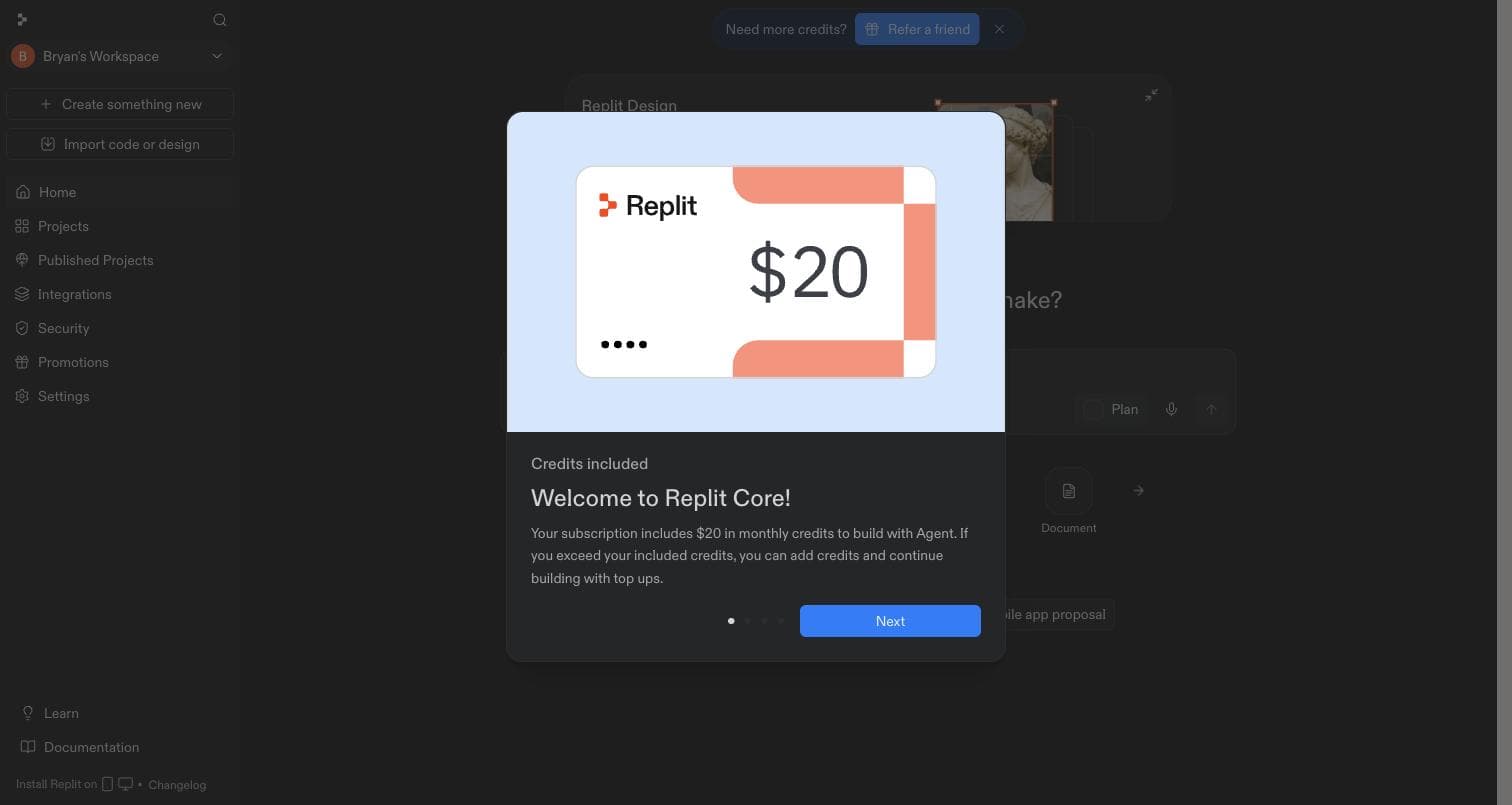
The Core code in Resources provides a free year with $20 of agent credits a month. A landing page like the one in these screenshots uses a fraction of that allowance.
Replit's onboarding offers auto-reload on the way in, and offers it switched on: top up $20 whenever the balance drops below $5, with the monthly limit set to none. That is a recurring charge on whatever card is attached to the account. Nobody should be accepting that on a kid's behalf, and no guide should click through it on a school laptop without knowing that is what the screen is.
If an account runs dry mid-block, pair the student with someone who has credits. Do not add a card.
5Where this gets usedThe block this page exists for1 module
Saturday’s whole-room MVP is the hard gate. Every student leaves with a live URL, so that is where a stall costs the most. Ready students may reach for the same tools in any earlier build, and later builds return to them as needed.
“It's just spinning.”Expect it
Wait thirty seconds, out loud, so they stop clicking things while it boots.
“It says I've hit a limit.”Expect it
Look under the message for a Keep going button and press it. It usually finishes the job.
“It built the wrong thing.”Expect it
Do not try to correct it in place. Roll back to the last checkpoint.
“I've been stuck on this for twenty minutes.”Expect it
Break the loop out loud. Twenty minutes on one bug is the signal, not the bug itself.
“It wants me to add a login / a database / payments.”
Decline all of it. Nobody in the room needs auth, a database or payments this weekend.
“My page is gone.”
Check the Design / Build toggle, top left. Put them in Build.
“I want to change the colours and the words.”
Say the change in plain English: “make the headline bigger and the background dark green.”
“It's finished but there's no link.”Expect it
Publish, top right. It takes about a minute.
- Switching to Power because a bug won't shift — The reflex to watch for. “Turning it up won't unstick that — roll back and re-prompt.” Power costs multiples per message, and the twenty minutes they are about to spend there is the most expensive twenty minutes of their weekend.
- Reading the code — “Close that. Ask the agent, don't read the diff.” Nobody learns anything from a file tree in fifty minutes.
- One giant paragraph of a prompt — “One change at a time. Ask, look, ask again.”
- Arguing with the agent — “It doesn't get offended and it doesn't remember. Roll back and re-prompt.”
- Watching the chat, not the app — “Watch the preview while it works. That's the fun part.”
- Two kids, one account — Fine for this sprint. One types, one calls the shots, swap at the halfway mark.
- Asking you to fix it for them — Don't. You're teaching the loop, not the language. Hand it back to the agent with them watching.
- Still perfecting at the 45-minute sweep — “Is it live? Then stop. Ugly ships now; the next block improves it.”
- A student who is moving fast — Let them run. Give them the Module 3 material early rather than holding them to the programming.